Contribution Guide
Purpose
The purpose of this guide is to help you understand the standards and procedures for contributing to the project. These standards are intended to make it clear to you how to contribute in a way that is consistent with expectations. By creating these standards, we make it possible for a group of people to collaborate and contribute with a minimum of confusion and friction. By following these standards, you can increase the speed at which you can contribute work to the project.
Process overview
Create an issue
Assign yourself to an issue
Create the branch from the GitHub GUI
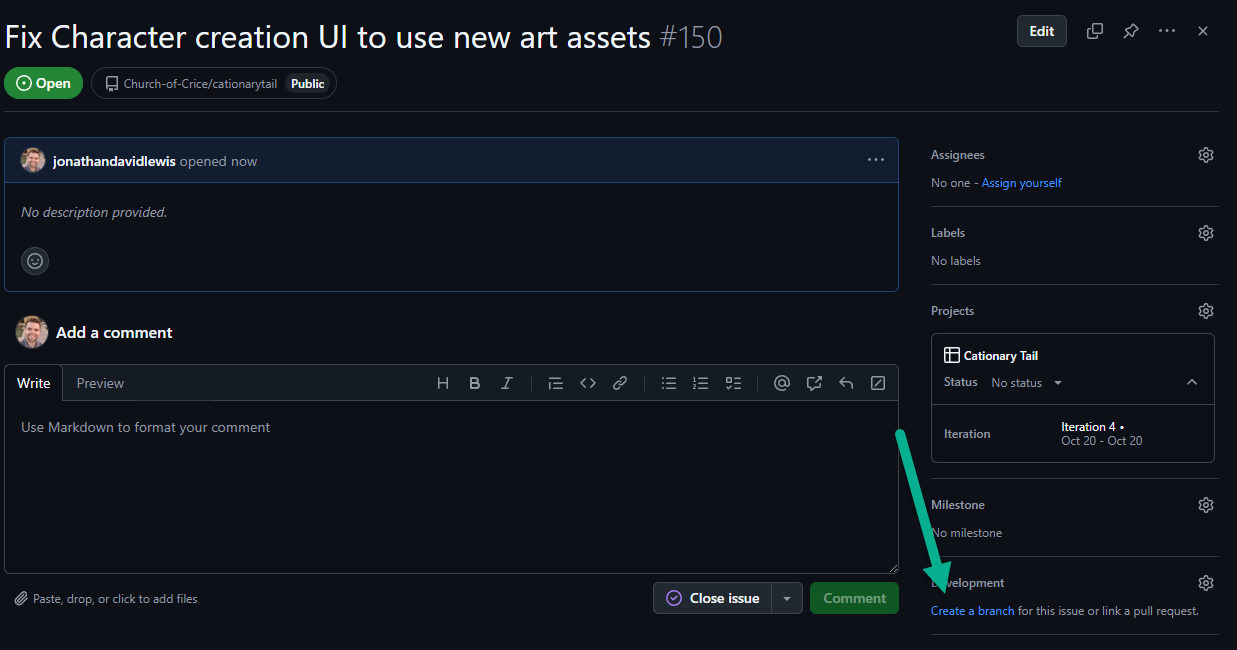
On the issue in GitHub, click the “create a branch” link on the bottom right.
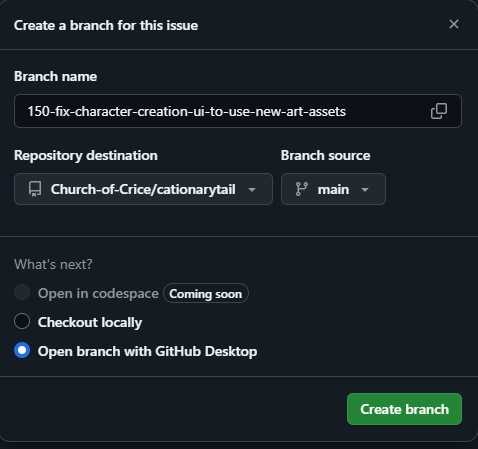
If you are using command line, choose “checkout locally”. If you are using GitHub Desktop, choose “open with GitHub Desktop”.
Make your contribution
Write clean code, add tests if needed, update documentation, and test your changes locally.
Contributing scenes
Contributing Scenes for contributing scenes.
Contributing Art
- Pixel Art: Follow the guide Contributing Pixel Art for contributing pixel art.
- Vector Art: TBA
- 3D Art: TBA
Create a pull request
Push your branch and create a pull request with a descriptive title and summary of changes.
Review the pull request
The pull request will be reviewed by peers or maintainers to ensure quality.
Merge the pull request
Once approved, merge the pull request and delete the branch if applicable.
General guidelines
- Commit messages: Use concise and descriptive messages.
- Code style: Follow the repository’s code style guidelines.
- Communication: Ask questions if unsure about anything.
Code of Conduct
Review and adhere to the project’s Code of Conduct to maintain an open and welcoming environment.
Questions?
Reach out via the project’s communication channels if you have questions.
Written by Jonathan Lewis
Please reach out if you have any questions or suggestions for improvements.