How to Make Looping Audio Tracks
Overview
This guide provides information on how to create looping audio tracks for games. It is specifically focussed on the technical specifications of the final files and not a specific process for a specific tool.
Looping Music
- For looping tracks, ensure the loop is seamless and doesn’t include any audible pops or clicks.
- Avoid fade-in or fade-out on loops unless specifically requested.
- If possible, provide two versions:
- Looping Version: For in-game looping (ensure seamless playback).
- Full Version: For promotional purposes or non-looped segments.
Store loop data in metadata
Given you have a file where the end of the file is designed to loop seamlessly back into an earlier part of the file:
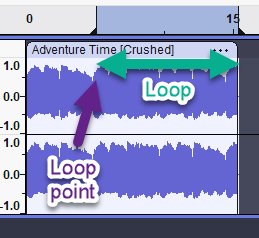
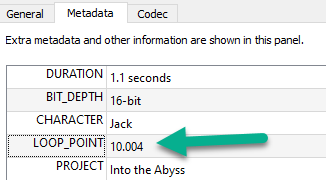
Set LOOP_POINT in the metadata to the point in seconds where the loop should start:
Example metadata with LOOP_POINT set to a value in seconds (with precision up to 0.001):
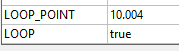
Also, set LOOP to true:
- Put
_loopat the end of the file name (e.g.,main_theme_loop_v4.ogg).